Is TiviMate Free on Firestick? (Complete 2026 Guide)
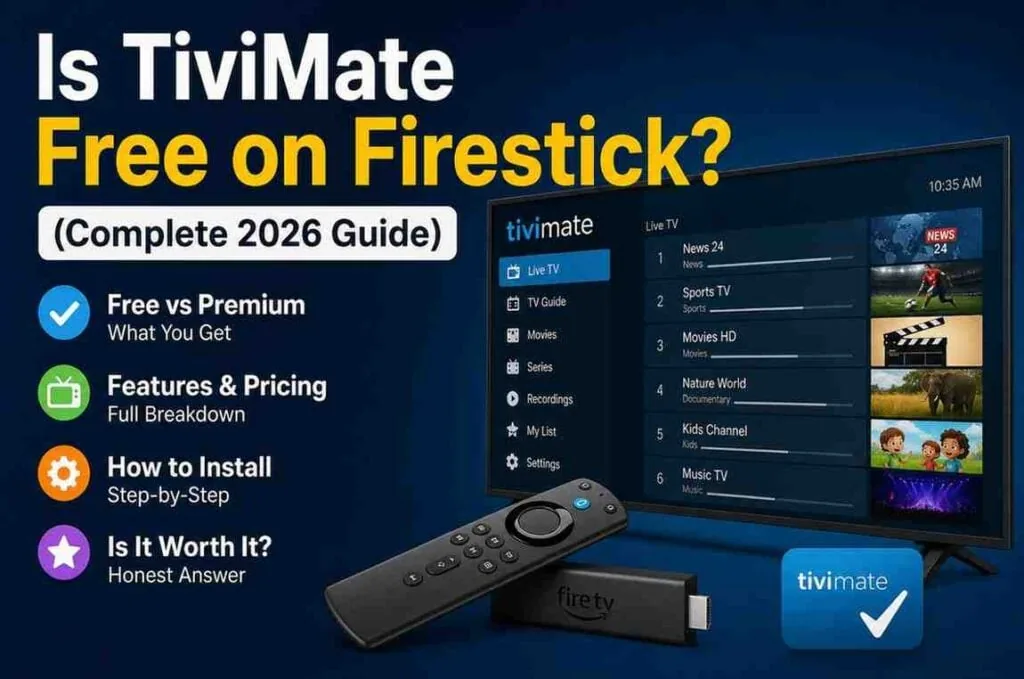
If you’ve just set up IPTV on your Firestick, chances are you’ve come across TiviMate. It’s one of the most talked-about IPTV players out there—and for good reason. Clean interface, fast performance, and a TV-like experience make it a favorite among streamers.
But one question keeps coming up:
Is TiviMate Free on Firestick?
The short answer: Yes… but not completely.
When people search for TiviMate Free on Firestick, they often expect a fully unlocked experience. In reality, there’s a free version you can use, but most of the features people love are locked behind a premium upgrade. Understanding how TiviMate Free on Firestick actually works will help you decide whether the free version is enough for your needs.
What Is TiviMate?
Before we get into pricing, let’s quickly understand what TiviMate actually does.
TiviMate is not an IPTV service. It doesn’t provide channels or content.
Instead, it’s a player—a tool that lets you watch IPTV subscriptions (like M3U playlists or Xtream Codes) in a clean, organized interface.
Think of it like this:
- IPTV provider = content
- TiviMate = the TV interface
And compared to many other IPTV apps, TiviMate feels much closer to a traditional cable TV experience.
Is TiviMate Free on Firestick?
Yes, TiviMate offers a free version, and you can install and use it on Firestick without paying anything.
However, the free version is very limited.
It’s more like a demo than a full app.
You can:
- Add your IPTV playlist
- Watch live TV channels
- Browse basic content
But that’s pretty much where it stops.
What You Get in the Free Version
The free version is usable—but basic.
Here’s what it includes:
Basic Channel Streaming
You can load your IPTV playlist and start watching channels right away.
Simple Interface
You still get TiviMate’s clean design, though not fully customizable.
Single Playlist Support
You can add one IPTV source and watch content from it.
Limitations of Free Version
This is where most users hit a wall.
You don’t get:
- No EPG (TV guide) customization
- No catch-up or recording
- No multi-screen (watch multiple channels at once)
- No favorites management (limited)
- No advanced settings
- No backup/restore
- No multiple playlists
In simple terms, the free version is fine for testing—but not ideal for daily use.
What Is TiviMate Premium?
TiviMate Premium unlocks the full experience.
This is where the app really shines.
Key Premium Features:
Full TV Guide (EPG)
You get a proper electronic program guide—just like cable TV.
Multiple Playlists
Combine different IPTV subscriptions in one place.
Catch-Up & Recording
Watch past programs or record live TV (if your provider supports it).
Multi-Screen Viewing
Watch multiple channels at once—great for sports fans.
Favorites & Customization
Organize channels exactly how you want.
Backup & Restore
Save your setup and restore it easily on another device.
TiviMate Premium Pricing (2026)
TiviMate Premium is surprisingly affordable.
Current pricing:
- Yearly Plan: Around $9–$10/year
- Lifetime Plan: Around $30 (one-time payment)
Most users go for the lifetime plan since it pays off quickly.
Is TiviMate Premium Worth It?
Let’s be honest—this is what you really want to know.
Short answer: Yes, for most people.
Here’s why:
1. Better User Experience
The free version feels limited. Premium feels like a full streaming platform.
2. Saves Time
Features like favorites, sorting, and EPG make navigation much faster.
3. Ideal for Heavy Users
If you watch IPTV daily, Premium is almost essential.
When Free Version Is Enough
Not everyone needs to upgrade.
The free version works if:
- You just want to test IPTV
- You watch occasionally
- You don’t care about TV guides or features
- You use a simple playlist
When You Should Upgrade
You’ll want Premium if:
- You watch IPTV daily
- You want a cable-like experience
- You use multiple IPTV providers
- You want recording or catch-up
- You like customization
How to Install TiviMate on Firestick
TiviMate isn’t available directly in the Amazon App Store, so you’ll need to sideload it.
Steps:
- Enable Apps from Unknown Sources
- Install the Downloader app
- Enter TiviMate APK URL
- Download and install
- Open the app and add your IPTV playlist
How to Activate TiviMate Premium
Important detail: You can’t buy Premium directly on Firestick.
You’ll need:
- An Android phone OR
- An Android emulator
Then:
- Install TiviMate Companion app
- Log in and purchase Premium
- Link your Firestick app to your account
Common Misconceptions About TiviMate
“TiviMate gives free channels”
No—it doesn’t provide content.
“Free version is enough forever”
Technically yes, but most users upgrade quickly.
“Premium is expensive”
Compared to what you get, it’s actually very cheap.
TiviMate vs Other IPTV Apps
Here’s how it stacks up:
IPTV Smarters
- TiviMate: Better UI, smoother experience
- Smarters: Easier setup
Perfect Player
- TiviMate: More modern
- Perfect Player: More basic
XCIPTV
- TiviMate: More customizable
- XCIPTV: Simpler
TiviMate usually wins for serious users.
Performance on Firestick
TiviMate runs smoothly on:
- Firestick Lite
- Firestick 4K
- Firestick 4K Max
However, performance depends on:
- Your internet speed
- IPTV provider quality
- Device storage and RAM
Tips to Get the Best Experience
Use a Fast Internet Connection
At least 20 Mbps recommended.
Clear Cache Regularly
Keeps the app running smoothly.
Use Ethernet Adapter (Optional)
More stable than WiFi.
Choose a Good IPTV Provider
Even the best app can’t fix bad streams.
Pros and Cons
Pros
- Clean, modern interface
- Fast performance
- Highly customizable
- Affordable premium
Cons
- Free version is limited
- Requires sideloading
- Premium setup needs extra steps
Final Verdict
So, is TiviMate free on Firestick?
Yes—but only at a basic level.
The free version lets you test the app, but it’s the premium version that delivers the full experience.
If you’re serious about IPTV, upgrading isn’t just worth it—it’s almost necessary.
Bottom Line
Free version = basic usage
- Premium = full IPTV experience
- Lifetime plan = best value
If you just want to watch casually, free is fine.
But if you want a smooth, cable-like experience on Firestick, TiviMate Premium is the way to go.