B1G IPTV Buffering Fix on Firestick UK (2026 Guide)
Streaming IPTV on a Firestick should feel smooth and effortless. You sit down, press play, and expect your channels to load instantly. But when buffering interrupts every few minutes, it quickly becomes frustrating—especially when dealing with B1G IPTV Buffering Firestick issues.
If your B1G IPTV UK keeps buffering on Firestick, you’re not alone. This is one of the most common problems users face with B1G IPTV Buffering Firestick, and it can seriously affect your viewing experience. The good news? Buffering is almost always fixable once you understand what’s causing it.
This guide breaks everything down in simple terms—no technical confusion, just real solutions that work to eliminate B1G IPTV Buffering Firestick problems for good.
What Is IPTV Buffering?
Buffering happens when your IPTV app pauses playback to load more data. Instead of streaming continuously, the video stops, loads, then resumes.
A little buffering at the start is normal. Constant buffering is not.
When it happens repeatedly, it means something is slowing down your stream.
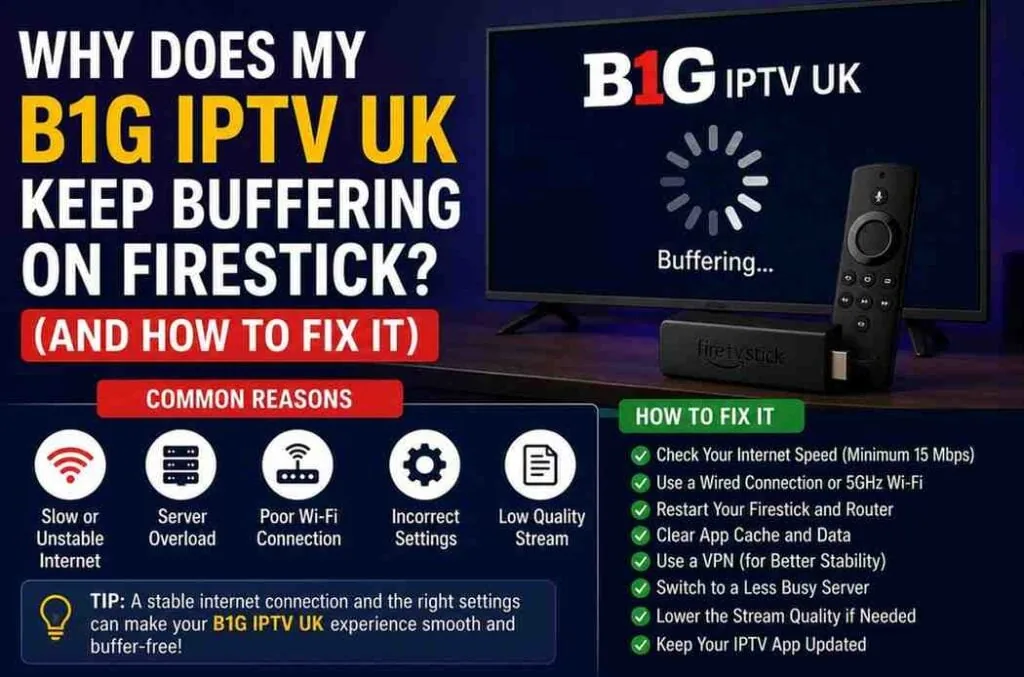
Main Reasons Why B1G IPTV UK Buffers on Firestick
Before fixing the issue, it’s important to understand what’s behind it. Most buffering problems fall into one of these categories.
1. Slow or Unstable Internet Connection
This is the number one cause.
IPTV requires a stable and fast internet connection. If your connection drops or slows down, buffering will happen instantly.
Recommended Speeds:
- SD Streaming: 10 Mbps
- HD Streaming: 20 Mbps
- 4K Streaming: 30+ Mbps
Even if your speed seems fine, instability (fluctuations) can still cause buffering.
2. Weak Wi-Fi Signal
Your Firestick might be too far from your router. Walls, furniture, and interference weaken the signal.
This leads to:
- Slow loading
- Frequent buffering
- Low-quality streams
3. Overloaded IPTV Servers
Sometimes the issue isn’t on your side.
If too many users are watching at the same time (especially during big matches), servers can slow down.
This is common during:
- Premier League matches
- Pay-per-view events
- Peak evening hours
4. Low Firestick Storage or RAM
Firestick devices have limited resources.
If your device is full or running too many apps:
- IPTV apps lag
- Streams buffer
- Performance drops
5. Poor IPTV Player App
Not all IPTV apps perform equally.
Some apps are poorly optimized and struggle with:
- Large playlists
- High-quality streams
- Live TV buffering
6. ISP Throttling
Internet Service Providers sometimes slow down streaming traffic—especially IPTV.
If your connection slows only while streaming, this could be the reason.
7. Wrong App Settings
Your IPTV player settings might not be optimized.
Common issues:
- Buffer size too low
- Hardware decoding disabled
- Wrong stream format
How to Fix B1G IPTV UK Buffering on Firestick
Now let’s move to what really matters—fixing the problem.
1. Check Your Internet Speed
Start with a speed test.
If your speed is below recommended levels:
- Upgrade your plan
- Restart your router
- Limit other connected devices
A stable connection matters more than just speed.
2. Restart Your Firestick and Router
Simple, but effective.
Steps:
- Unplug Firestick
- Turn off router
- Wait 2 minutes
- Turn everything back on
This clears temporary issues and refreshes your connection.
3. Move Your Router Closer
Distance weakens Wi-Fi.
Fix:
- Keep router in the same room
- Avoid walls or metal objects
- Place it higher (not on the floor)
Better signal = smoother streaming.
4. Use Ethernet Instead of Wi-Fi
Wi-Fi is convenient, but not always reliable.
For best performance:
- Use a Firestick Ethernet adapter
- Connect directly to your router
This provides a stable and faster connection.
5. Clear Cache on IPTV Apps
Apps store temporary files that can slow performance.
Steps:
- Go to Settings
- Select Applications
- Manage Installed Apps
- Choose your IPTV app
- Click “Clear Cache”
Do this regularly to keep things running smoothly.
6. Close Background Apps
Firestick runs multiple apps in the background.
These consume memory and slow down streaming.
Fix:
- Force stop unused apps
- Restart your device regularly
7. Use a Reliable IPTV Player
Some IPTV apps handle buffering better than others.
Recommended players:
- TiviMate
- IPTV Smarters Pro
- IBO Player
These apps offer better performance and buffering control.
8. Adjust Buffer Settings
Many IPTV apps allow buffer customization.
Try increasing buffer size:
- Helps reduce interruptions
- Improves playback stability
9. Use a VPN
A VPN can solve multiple problems:
- Bypass ISP throttling
- Improve streaming speed
- Access stable servers
Choose a fast and reliable VPN for best results.
10. Reduce Streaming Quality
If your internet struggles with HD or 4K:
Switch to:
- SD or HD instead of 4K
Lower quality = less buffering
11. Update Your Apps and Firestick
Outdated software causes performance issues.
Always:
- Update IPTV apps
- Update Firestick system
This ensures better compatibility and fewer bugs.
12. Reinstall IPTV App
If nothing works, reinstalling often fixes hidden issues.
Steps:
- Uninstall app
- Restart Firestick
- Install again
- Add your IPTV subscription
Best Settings for Smooth IPTV Streaming
Here’s a quick setup for optimal performance:
- Enable Hardware Decoding
- Increase Buffer Size
- Use MPEG-TS or HLS formats
- Turn off unnecessary features
These small tweaks make a big difference.
When the Problem Is NOT You
Sometimes everything on your side is perfect, but buffering still happens.
This usually means:
- Server overload
- Provider maintenance
- Channel-specific issues
In this case:
- Try another channel
- Wait and retry later
Pro Tips to Prevent Buffering
Consistency matters more than quick fixes.
Follow these habits:
- Restart your Firestick weekly
- Clear cache regularly
- Avoid overcrowded Wi-Fi networks
- Use wired internet when possible
These steps reduce buffering long-term.
Why B1G IPTV UK Still Stands Out
Despite occasional buffering, a good IPTV service offers:
- Wide channel selection
- HD and 4K streams
- Reliable uptime
- Sports and entertainment coverage
Most buffering issues come from setup—not the service itself.
Common Mistakes Users Make
Avoid these mistakes:
- Using slow internet
- Ignoring app updates
- Running too many apps
- Using low-quality IPTV players
Fixing these alone can solve most buffering issues.
Final Thoughts
Buffering on Firestick can feel frustrating, but it’s rarely permanent.
In most cases, the issue comes down to:
- Internet quality
- Device performance
- App settings
Once you fix these areas, your streaming experience improves instantly.
If you follow the steps in this guide, you’ll move from constant buffering to smooth, uninterrupted viewing.