IPTV Smarter Firestick Setup for B1G IPTV UK
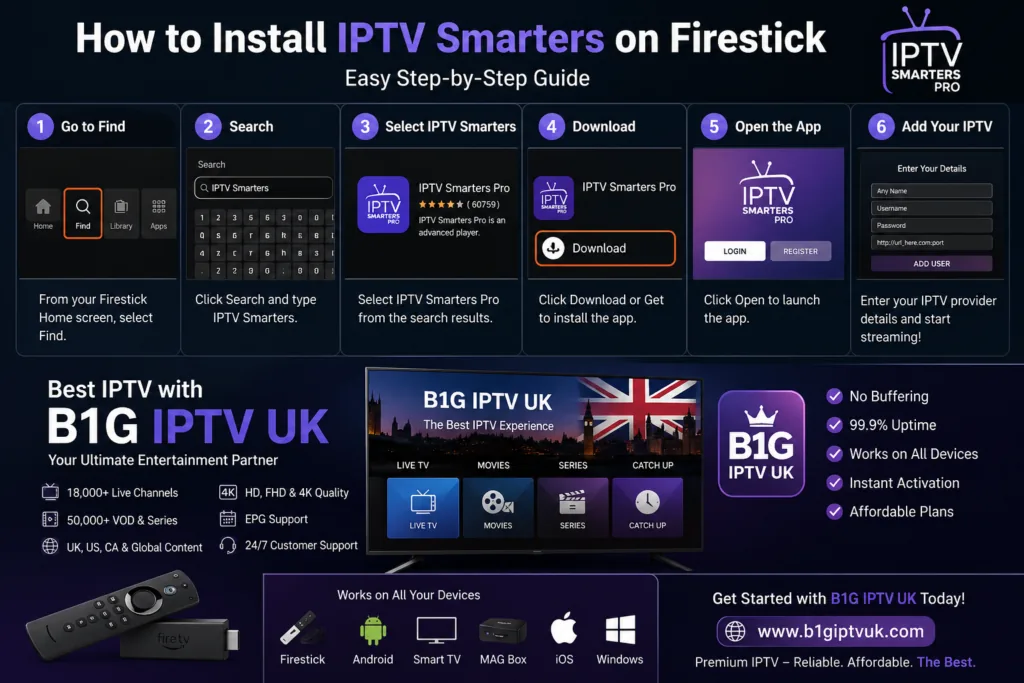
Streaming has completely changed how people watch TV, and devices like the Amazon Firestick have made it easier than ever to access content from around the world. If you want to Install IPTV Smarters Firestick, you’re choosing one of the most popular apps for IPTV streaming, known for its smooth interface and powerful features.
If you’ve been searching for a simple, clear, and human-friendly guide to Install IPTV Smarters Firestick—and want to pair it with a reliable service like B1G IPTV UK—you’re in the right place.
This guide walks you through everything step by step so you can easily Install IPTV Smarters Firestick and start streaming without confusion or delays.
What is IPTV Smarters?
IPTV Smarters is a media player application designed specifically for IPTV services. It does not provide content itself but allows you to stream channels, movies, and TV shows using login credentials from an IPTV provider.
It supports:
- Live TV streaming
- Video on Demand (VOD)
- Series and catch-up TV
- Multi-screen support
- External player integration
Its clean interface and fast performance make it one of the top choices for Firestick users.
Why Use IPTV Smarters on Firestick?
There are many IPTV apps available, but IPTV Smarters stands out for several reasons:
1. User-Friendly Interface
Even beginners can navigate the app easily without confusion.
2. Multiple Login Options
You can log in using:
- Xtream Codes API
- M3U Playlist URL
3. High Compatibility
Works perfectly with Firestick, Android TV, and mobile devices.
4. Advanced Features
Includes parental control, EPG support, and built-in player.
Requirements Before Installation
Before installing IPTV Smarters on your Firestick, make sure you have:
- A working Amazon Firestick
- Stable internet connection
- IPTV subscription (e.g., B1G IPTV UK)
- Amazon account logged into Firestick
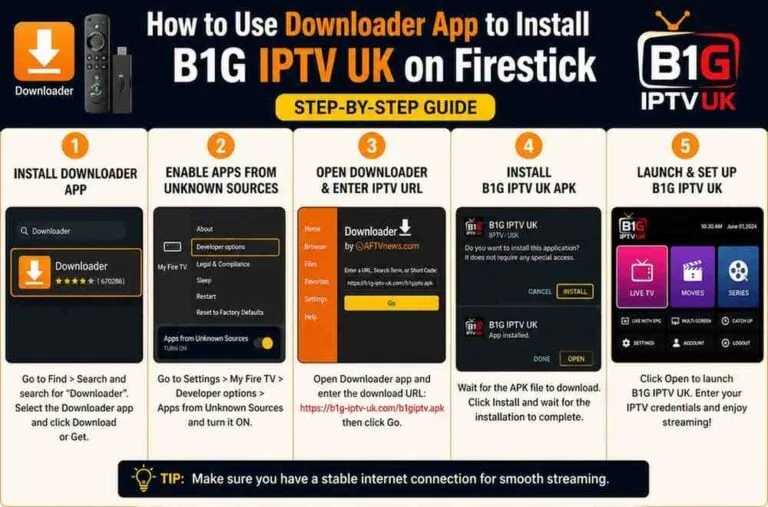
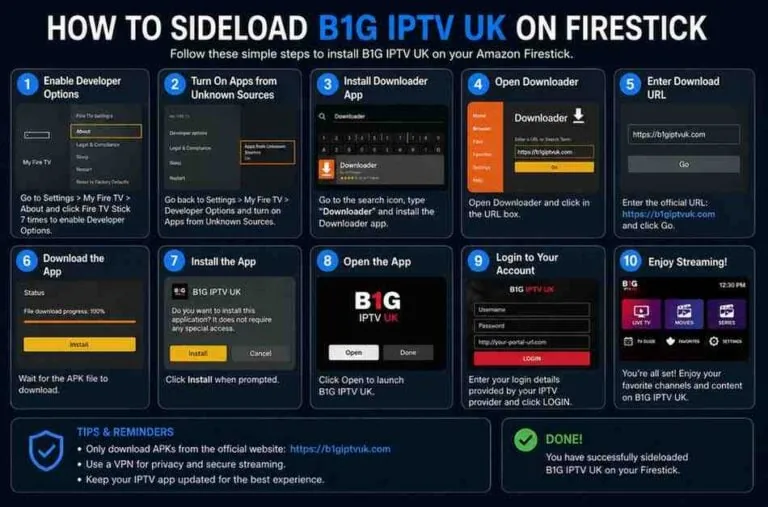
Step 1: Enable Apps from Unknown Sources
Since IPTV Smarters is not available directly on the Amazon App Store, you need to enable sideloading.
Follow these steps:
- Go to Settings on your Firestick
- Select My Fire TV
- Click Developer Options
- Turn ON:
- Apps from Unknown Sources
- ADB Debugging
This allows you to install third-party apps safely.
Step 2: Install Downloader App
The Downloader app is essential for installing IPTV Smarters.
Steps:
- Go to Firestick Home Screen
- Click Find > Search
- Type Downloader
- Install the app
Once installed, open it.
Step 3: Download IPTV Smarters
Now you’ll use Downloader to install IPTV Smarters.
Steps:
- Open Downloader
- Allow permissions when prompted
- Enter the IPTV Smarters APK URL
- Click Go
- Wait for download to complete
- Click Install
- After installation, click Done
- Delete the APK file to save space
Now IPTV Smarters is installed on your Firestick.
Step 4: Launch IPTV Smarters
To open the app:
- Go to Apps & Channels
- Select IPTV Smarters
- Launch the app
You’ll now see the login screen.
Step 5: Login to IPTV Smarters
There are two main login methods:
Method 1: Xtream Codes API (Recommended)
This is the easiest method.
Enter:
- Username
- Password
- Server URL
These details are provided by your IPTV provider (e.g., B1G IPTV UK).
Method 2: M3U Playlist URL
Alternatively, you can use:
- M3U URL provided by your IPTV service
Paste the link into the app and continue.
Why Choose B1G IPTV UK?
Choosing the right IPTV service is just as important as installing the app. While IPTV Smarters is only a player, the actual streaming quality depends on your provider.
B1G IPTV UK is often considered one of the best IPTV options due to its reliability and features.
Key Features of B1G IPTV UK
1. Wide Channel Selection
Access thousands of international and UK channels.
2. HD & 4K Streaming
Enjoy high-quality streaming with minimal buffering.
3. VOD Library
Massive collection of movies and TV series.
4. Fast Servers
Stable streaming with minimal downtime.
5. EPG Support
Electronic Program Guide for easy navigation.
How to Add B1G IPTV UK to IPTV Smarters
Once you have your subscription:
Using Xtream Codes:
- Open IPTV Smarters
- Click Login with Xtream Codes API
- Enter details provided by B1G IPTV UK
- Click Add User
Your channels will load automatically.
Using M3U URL:
- Select Load Your Playlist or File URL
- Enter M3U link
- Click Add User
Tips for Best Streaming Experience
To get the most out of IPTV Smarters:
1. Use a Stable Internet Connection
At least 20 Mbps is recommended for HD streaming.
2. Clear Cache Regularly
Improves app performance.
3. Use External Player
For better playback, try VLC or MX Player.
4. Keep App Updated
Always use the latest version for best performance.
Common Issues and Fixes
IPTV Smarter Not Loading
- Check internet connection
- Restart Firestick
Login Not Working
- Verify credentials
- Check server URL
Buffering Issues
- Use wired connection (Ethernet adapter)
- Reduce streaming quality
Is IPTV Smarters Legal?
IPTV Smarters itself is 100% legal—it’s just a media player. However, the legality of IPTV content depends on your provider and local laws.
Always use trusted and legitimate IPTV services.
Advantages of Using IPTV Smarters with B1G IPTV UK
- Seamless integration
- Fast channel loading
- Reliable streaming
- User-friendly experience
Together, they create one of the best IPTV setups for Firestick users.
Final Thoughts
Installing IPTV Smarters on Firestick is straightforward once you know the steps. With the help of the Downloader app and a few settings adjustments, you can quickly set up a powerful streaming system.
Pairing IPTV Smarters with a reliable provider like B1G IPTV UK takes your experience to the next level, giving you access to a massive library of live TV and on-demand content.
Whether you’re new to IPTV or upgrading your setup, this combination offers flexibility, quality, and convenience.